
How to Clean a TV Screen
Learn how to safely clean modern LED, OLED, and 4K TV screens without scratching delicate coatings, causing liquid damage, or leaving cloudy streaks.
Unplug the TV, dust with a dry microfiber cloth, dampen a clean cloth with water or an approved cleaner, wipe gently, then dry with a second microfiber cloth. Never spray directly on the screen.
Watch: How to Clean a TV Screen Without Damage
Power down, use the right cloth and solution, and never spray the panel directly. · 2:53 minute walkthrough. The full written steps are below.
Clean the coating, not just the glass
Modern screens have delicate anti-glare and anti-reflective coatings. The safest approach is dry dusting first and using as little liquid as possible.
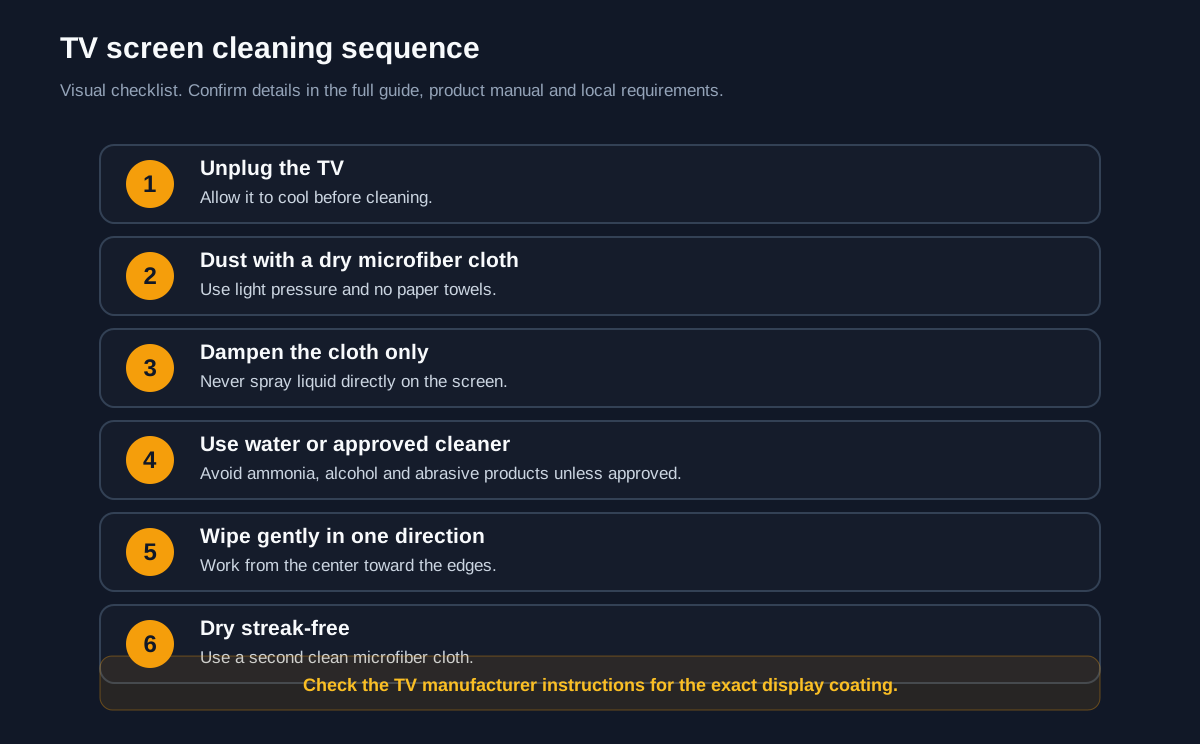
Before you start
- Unplug the TV and let it cool.
- Dust with a clean, dry microfiber cloth.
- Dampen the cloth, never the screen.
- Use a second dry cloth to remove streaks.
Common failure points
- Avoid ammonia, alcohol and abrasive cleaners unless approved.
- Do not use paper towels or rough cloths.
- Check the manufacturer guidance for the specific display.
Watch the original demonstration
See the source video before you start, then use the step checkpoints below as your field guide.
Play source video on YouTubeKeep learning
- Clean an Apple WatchAnother sensitive electronic display.
- Clean a PhoneUse safe electronics-cleaning habits.
- Replace a Broken TV ScreenFor physical damage rather than dirt.
Visual step map
See the full sequence before you start, then check off each step as you go.
0 of 5 steps checked
Materials and cost planner
Select the items you plan to buy, adjust any estimated price, and calculate the selected total.
Editable rough U.S. retail estimates. Estimated all listed: $40.00. Prices are planning estimates, not quotes — tax, store, brand, size and quantity will change them.
Time and finish planner
Estimate active working time from the number of steps in this guide.
Room surface area calculator
Estimate the wall, ceiling and floor area of a room for planning cleaning time and supplies.
Subtract large fixtures or appliances that will not be cleaned. Never mix cleaning chemicals unless the manufacturer explicitly says it is safe.
- Read the tools, materials, safety notes, and steps below for free.
- Tap See 20-second demo if you want to understand it first.
- Tap Start Camera Coach when you want hands-free help, or Voice-only if you do not want to use the camera.
- Allow camera and microphone. Point your phone at the work; the coach watches your progress and tells you the next step.
🧰 Required Tools & Equipment
- ✓ Clean microfiber cloths (at least 2)
- ✓ Spray bottle
- ✓ Soft-bristle detailing brush or air blower
📦 Materials & Supplies
- ✓ Distilled water
- ✓ Screen-safe cleaner (optional)
⚠️ Safety Checkpoints & Warnings
- • Ensure the TV is completely powered off and unplugged from the wall to prevent electrical damage and see smudges easily.
- • Verify the screen is completely cool to the touch before applying any cleaning cloth or solution.
- • Never spray liquid directly onto the TV screen; always spray onto the cloth first.
📋 Step-by-Step Guide (5 Steps)
Power Down and Cool the Display
Turn off the TV and disconnect the power cord from the wall outlet. Wait 5 to 10 minutes to allow the panel to cool down completely. A dark, cool screen makes dust, fingerprints, and smudges clearly visible while preventing solutions from evaporating too quickly.
- • TV screen is completely black with no active standby lights
- • Power cable is visibly detached from the wall or TV base
- • Cleaning while the screen is warm or actively displaying content
- • Leaving the device plugged in while using damp materials
Dust the Screen Surface
Take a completely dry, clean microfiber cloth or a soft-bristled brush and gently sweep away loose surface dust. Move in smooth, horizontal strokes from the top of the display down to the bottom. Do not press hard, as dragging hard grit against the panel can cause micro-scratches.
- • Screen surface is free of visible dust layers and loose lint
- • Cloth glides smoothly across the panel without resistance
- • Pressing firmly against the flexible panel surface
- • Using paper towels or old cotton rags that shed lint and scratch
Dampen Cloth with Distilled Water
Hold a second microfiber cloth away from the television and lightly mist it with distilled water. The cloth should be barely damp, never soaking or dripping. Squeeze the cloth firmly to distribute the moisture evenly across the fibers.
- • Cloth is evenly moist with no water dripping when squeezed
- • No moisture droplets are visible airborne near the TV chassis
- • Spraying water directly onto the screen panel
- • Oversaturating the cleaning cloth
Spot Clean Smudges and Fingerprints
Gently wipe stubborn fingerprint oils and spots using the damp section of the cloth. Use light, overlapping circular motions over the smudge, then finish with a broad horizontal pass. Support the back of the TV housing with your free hand if it sits on a stand to prevent tipping.
- • Fingerprints and oily residue dissolve away
- • A faint, rapidly evaporating moisture film appears behind the cloth
- • Scrubbing vigorously at dried spots with fingernails
- • Using window cleaners containing ammonia or alcohol
Dry and Buff the Surface
Immediately take the clean, dry section of your first microfiber cloth and buff the entire screen. Move in gentle, uniform horizontal strokes from top to bottom to lift remaining moisture before it air-dries into spots. Check the screen with a light source from multiple angles to confirm all streaks are gone.
- • Panel displays a uniform, matte or deep gloss reflection with zero streak lines
- • No water spots or haze remaining when viewed from a side angle
- • Allowing moisture to air-dry naturally
- • Using a dusty portion of the cloth for the final buffing pass
Credit: inspired by an original tutorial by Digital Trends — watch the original on YouTube.
Don’t have everything?
- No Distilled water? Boiled and cooled filtered water (free of heavy sediment)
- No Soft-bristle detailing brush? Clean, unused makeup powder brush or camera lens blower
- No Screen-safe cleaner? 100% pure distilled water (safest and recommended choice)
Frequently asked questions
Can I use Windex on a TV screen?
Do not use ammonia, alcohol or abrasive cleaners unless the TV manufacturer specifically approves them. They can damage anti-glare and anti-reflective coatings.
What cloth should I use on a TV?
Use a clean, soft microfiber cloth. Avoid paper towels, rough fabric and dirty cloths that can scratch the screen.
Should I spray cleaner directly on the TV?
No. Spray or dampen the cloth first, never the screen. Excess liquid can run into the bezel and electronics.
Should the TV be on or off while cleaning?
Turn the TV off and unplug it first. A dark screen makes streaks and dust easier to see, and unplugging reduces electrical risk.